Blanc Mail · for Mac · Coming soon
A little less inbox.
Blanc Mail brings a careful, native Gmail experience to your Mac.
The Island, made for mail.
Blanc Browser’s floating Island, rebuilt for email. One capsule floats over your inbox in place of a toolbar, and ⌘L or ⌘F opens it in place to search, jump and act.
-
Jump anywhere
Type a few letters to jump to a mailbox, label, conversation, set or person in the accounts you’re viewing, or press ⇧↵ to search all your mail.
-
Commands with a slash
Type / to snooze, set aside, label, move, archive or trash what you’ve selected, or start a new message or rule. A command that can’t run yet says why.
-
Actions at hand
Select a conversation and the Island holds Archive, Snooze, Set Aside, Labels and Trash, with Reply, Forward and the rest one click away.
Every account, one calm inbox.
-
Every account together
Up to five Gmail accounts in one unified inbox, each with its own color. One search covers all of them.
-
Set Aside
Put conversations into a named set, like “Read on the flight”, and they leave your Inbox to wait in the sidebar. Give a set a review date and it’s marked due when the day comes; nothing moves on its own. Set names and dates stay on this Mac.
-
A native window
Three familiar panes, keyboard friendly navigation, and a macOS app built with SwiftUI.
-
Gmail first
Connect your Google account directly. Mail is stored locally for reading and draft recovery.
-
A moment to change your mind
Archiving takes effect at once, with five seconds to undo it.
-
Later, on your terms
Snooze a conversation until you need it, or write now and send later. Scheduled mail goes out the next time Blanc Mail is running and online on your Mac.
-
Ghost Mode
Hide a conversation or a whole Gmail label from view, then unlock it with Touch ID or your password. It locks again on a timer. Ghost Mode keeps things off your screen; it isn’t encryption.
-
Replies you type often
Save templates for the answers you give again and again; they stay on your Mac. Gmail’s vacation responder is in Settings too.
-
Drafts that keep up
Move a draft to another account without losing a word. If anything interrupts you, your draft picks up right where you left off.
Rules that read like sentences
Your Gmail filters, written out in plain words. Rules run in Gmail, so new mail keeps getting sorted even while Blanc Mail is closed, and rules you made in Gmail on the web appear too.
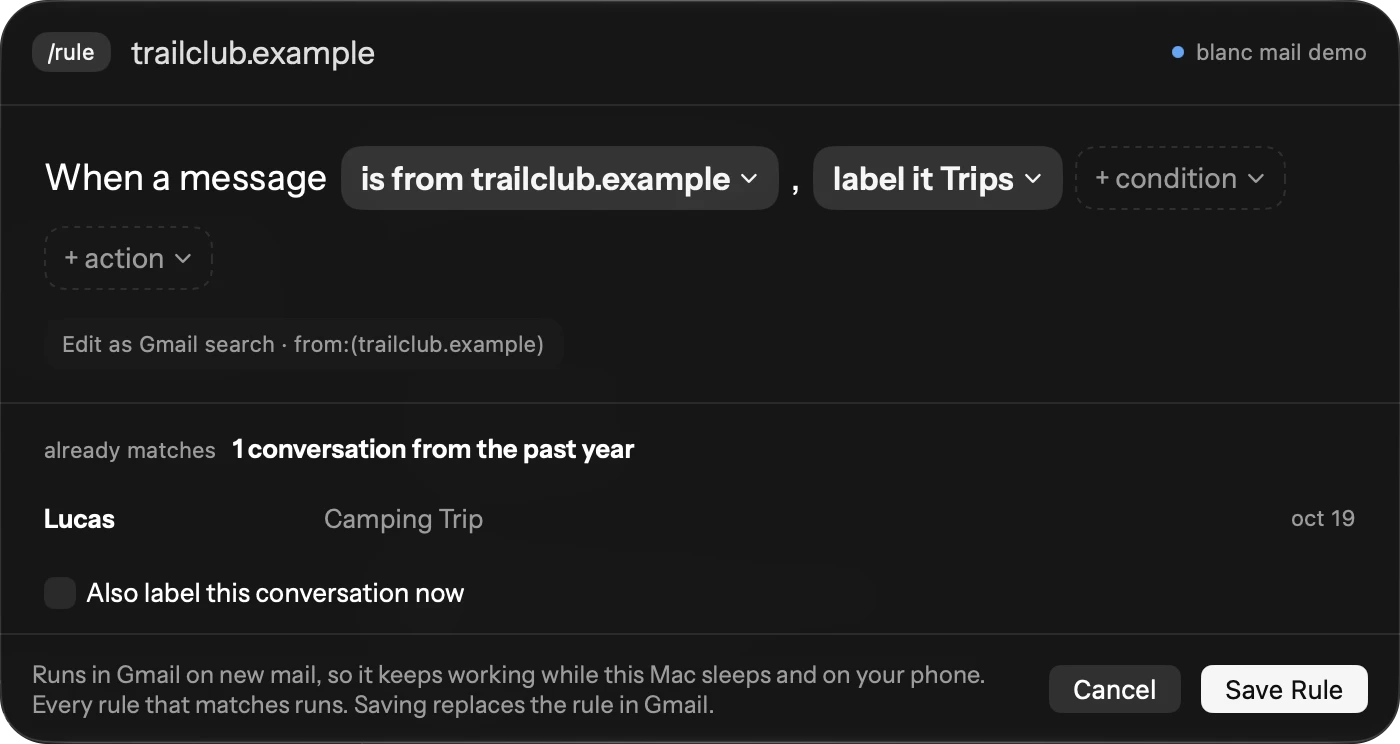
Careful in what it sends, generous in what it accepts.
-
Safe to read
Messages are sanitized before they’re shown, and scripts in them never run. Malformed mail still renders rather than leaving a blank pane.
-
No accidental double sends
If a send fails and Gmail’s answer is unclear, Blanc Mail never retries it on its own.
-
Nothing added to your mail
Blanc Mail adds no read receipts and no open or click tracking to the mail you send.
-
Privacy choices
Turn off automatic remote content in Settings. An optional Private Push relay sends refresh signals without receiving mail content.
A good home for your mail.
Start with a 14-day local trial when Mail launches. No card is needed to begin.
Purchases are not open yet. Current Browser Patron subscribers will be able to upgrade to Suite through Polar on the same billing period, and their Browser license key keeps working without being entered again. Existing Patron and founding benefits continue to apply to Browser only.
-
Blanc Mail
$4.99 / month
or $49.99 / year- Blanc Mail on macOS
- Gmail-first native app
- 14-day local trial
-
Blanc Suite
$7 / month
or $70 / year- Blanc Browser Patron on macOS, Windows, and Linux
- Blanc Mail on macOS
- Your Browser and Mail license keys in one subscription
What happens when a subscription ends?
Blanc Mail keeps your mail readable, searchable, and exportable. Composing and sending pause until a valid license is available. Browser's free features remain free.
Support
For help with the Mac app or your license, email support@blanc.day.
-
Accounts and data
Blanc Mail connects to Gmail with Google Sign-In. Removing an account clears its local cache after any pending draft recovery is resolved. You can also revoke the app’s access from your Google Account permissions.
-
Uninstalling
Quit the app and move Blanc Mail to the Trash. To erase local settings and recovery data too, first resolve any drafts you need, then remove the app’s data under your Mac’s Application Support folder. Renaming the app does not erase an existing test install’s local data or Keychain credentials.
-
Updates and licensing
After launch, Check for Updates in the app will use its signed Sparkle feed. New subscriptions will be handled by Polar. Existing beta keys will continue to work. To have a previous key sent again, email support@blanc.day from the address you bought it with.
Blanc Mail for Mac.
The first download will appear here after the signed macOS build, Gmail sign-in, Private Push, and Sparkle update checks pass.
macOS 14 or later on an Apple Silicon or Intel Mac, plus a Google account. Blanc Mail does not have a Windows or Linux edition planned for launch.
At launch, a Blanc Suite subscription will include Browser Patron benefits on Browser's supported platforms and Mail on macOS.
Blanc Mail remains in development. The download and checkout will appear after its macOS release checks are complete.
Blanc Browser is available now on macOS, Windows, and Linux.