Keep the web in front.
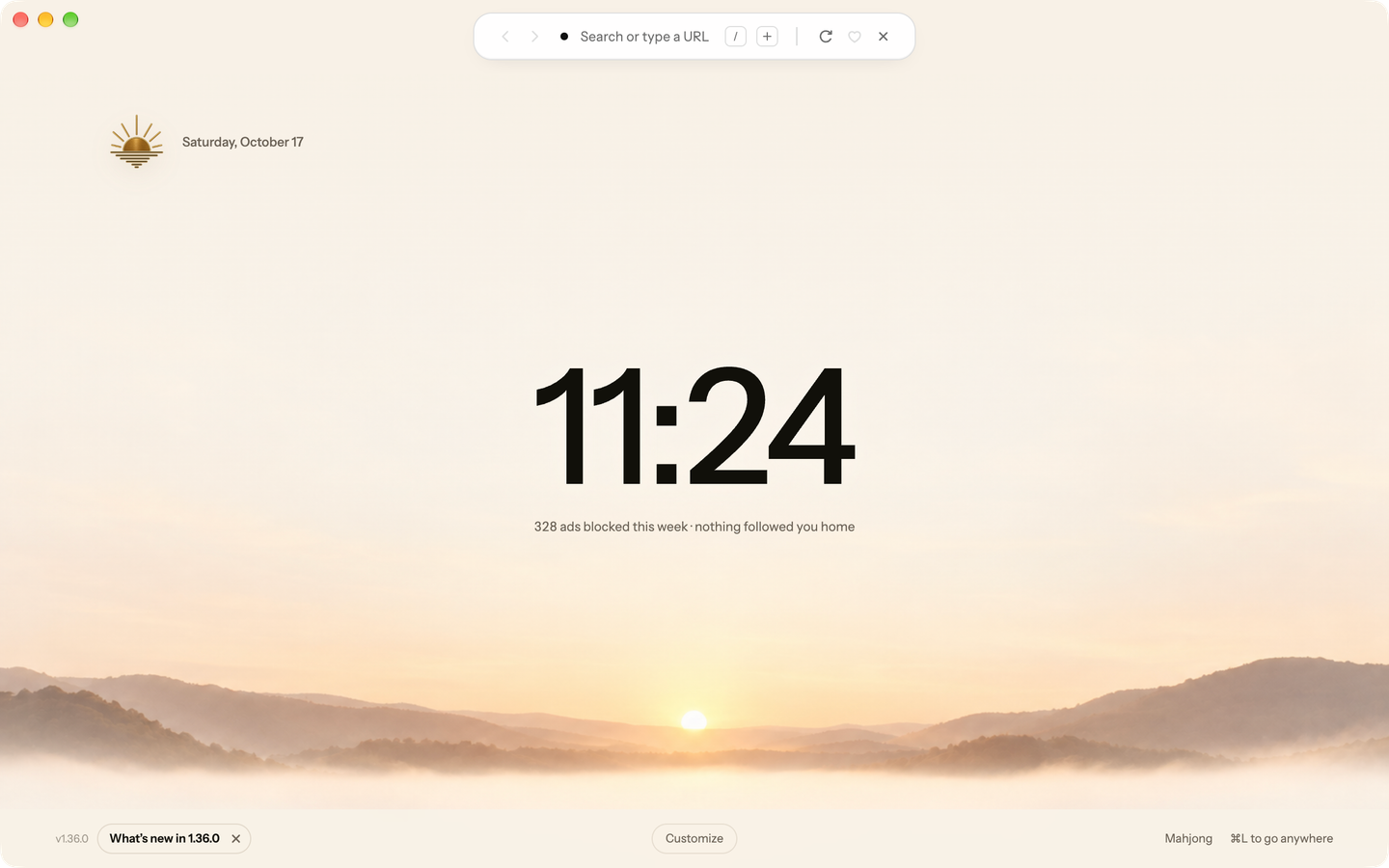
The resting island keeps navigation and tab controls in a slim band above the page. Open its panel for more controls without shifting the page below.
Blanc Support
Find an answer. Get back to what you were doing.
Include your Blanc version and operating system. Keep passwords and private browsing information out of your message.
The resting island keeps navigation and tab controls in a slim band above the page. Open its panel for more controls without shifting the page below.
At rest, the island shows the tabs in your current group as dots, the site you are on, and a quiet shield. Click the shield to see the connection and change Blanc Blocker for that site.
Move toward the island and it rises and grows a little, settling before you click and easing back as you leave. It follows how close you are rather than switching on at a threshold, so there is no edge to feel—and it stays completely still while another app has focus.
The command bar grows out of the resting island—starting at its exact size and shape, corners rounding out as it expands—and shrinks back into it when you dismiss. If you have reduce motion turned on, both of these are off entirely.
Find tabs, Favorites, history and groups alongside search results. For search text, Enter opens the highlighted result. A strong match can come first; choose the search result showing your exact text when you want to search the web.
Open the island to switch tabs, navigate, favorite a page, start a private tab, or use the browser's commands—without moving the page underneath.
The resting Island’s Plus opens one regular, ungrouped tab and focuses its address field. It sits beside the slash-command keycap. In vertical-tabs mode, use the rail’s New tab control instead.
On macOS, Settings offers Sunrise and Sunrise Dark. Both app-icon choices are free; no Patron subscription is required.
Try a list of Favorites, local frequent sites, or launch standalone Mahjong from any footer. Explore the four Start Page layouts.
The Quick Switcher matches across open tabs, favorites, browsing history, and named groups. Choose a result to focus it without sorting through a tab strip.
Live provider suggestions appear alongside local matches when enabled. For search text, Enter opens the highlighted result. A strong match from your tabs, Favorites, history or groups can come first. Choose the search result showing your exact text to search the web. Provider suggestions can be turned off before first use or later in Settings.
Type / to see commands for everyday browser work, including
/private, /find, /group work, and /allow-ads.
The command palette floats over the page instead of moving content to make room. Dismiss it with Escape when you are done.
Use Recently Closed to pick a tab or group, or Blanc Spaces to switch saved sets.
/favorites /bring-tabs /save [folder] /history /archive /downloads /settings /sync /clear /new /private /close /reopen /pin /mute /sleep /rename [name] /group <name> /ungroup /close-group /send <device> /copy [clean] /reader /find /block-ads /allow-ads /dark-site /route [off] /1password /theme [system|light|dark] /patron /space /glance <text> /invite
Use /group work to create or join a named group from the active
tab. A group exists only while it has tabs in it.
Right-click a group’s header, or press its ⋮, and pick one of eight colors. The group’s block takes a light tint, and its tabs’ dots in the Island take the color. Groups start without one.
The same menu holds the group’s name and color, New Tab in Group, Move Group to New Window, Ungroup and Close Group.
The resting island shows the active group's tabs. Group names and the rest of your groups live in the expanded panel, where you can choose what to return to.
In the expanded Island or in vertical tabs, drag a tab to reorder it within its group, move it into another group, or take it out of its group. Drop a tab on a group’s header to add it, even when the group is folded. Drag a header to move the whole group; ⌘1 to ⌘9 on a Mac, or Ctrl+1 to Ctrl+9 on Windows and Linux, follow the new order.
Tabs outside a group can sit above, between or below your groups. New tabs still start at the bottom.
Focus a tab or a group header and press Option+Shift+Up or Down on a Mac, or Alt+Shift+Up or Down on Windows and Linux. Folded groups are skipped, and pinned tabs stay pinned.
Groups can tuck away in the panel, and the Quick Switcher finds them by name when it is time to return.
Choose View → Tab Layout → Vertical Tabs, or press Command or Control Alt V. The page you are reading stays exactly where it is — nothing reloads.
Every open tab becomes a row with its title, so a wide session stays readable instead of shrinking into dots. Drag the rail's edge to the width you want; Blanc remembers it on this device.
Drag a tab or a group header in the rail to reorder it, move a tab between groups, or move a whole group. On a focused row, Option+Shift+Up or Down on a Mac, or Alt+Shift+Up or Down on Windows and Linux, does the same from the keyboard. The expanded Island uses the same moves.
The rail is an overview, not a second interface. Searching, navigating, and commands stay on the island, so nothing you have learned about Blanc changes.
Settings, General, Quiet inactive tabs: off, 30 minutes, 1 hour, or 6 hours. It starts at an hour, and the choice stays on this device rather than following you to another one.
Type /sleep in the island and every eligible background tab
goes quiet immediately. It skips the waiting and nothing else, and it works
even with the delay switched off.
Opening a quiet tab reloads the page and brings back its address, its title, and its back button. Nothing disappears from your session while it is quiet.
A half-filled form, a ticked checkbox, a page that asks before you leave, or the result of something you submitted. Blanc checks every frame on the page, not just the top one.
Sound, video you have paused, muted tabs, pinned tabs, a window a page opened for a sign-in, and any tab waiting on a permission prompt.
A page you have scrolled a long way down is left as it is, because a reloaded feed cannot honestly put you back where you were.
Press ⌘⇧T on macOS or Ctrl+Shift+T on Windows and Linux, type /reopen, or open the Island panel and choose an entry from Recently Closed.
Closing a named group records one undo entry. Reopen it to restore its ordinary tabs together, including its name, member order, and pins.
Reopening in one window uses that window’s list. Use Forget for one entry or Clear all to remove the list.
At most one eligible closed page per window can retain the same page for about 30 seconds. Reopening it during that time can preserve things such as scroll position and text you were typing without fetching the page again.
A still-recent entry falls back to a safe navigation snapshot or its URL. Page state is not guaranteed, and Blanc never silently resubmits a form. Loading, recording, quiet, and other ineligible pages do not receive the same-page recovery window.
Recently Closed holds up to 25 entries per window, and entries expire after one hour. It lives only in memory and ends when the app quits.
Personal is permanent and keeps your existing Blanc data. In Settings, name another profile and choose Create profile window.
Named profiles isolate cookies, site data, Favorites, history, download metadata, and remembered permissions. Their ordinary and private sessions are separate from other profiles.
Each native window owns its tabs, groups, Island panel, and Recently Closed list. Saved windows return to their associated profile after relaunch.
Appearance, network and privacy preferences, usage-measurement choices, and Patron status remain shared across the device.
Sync is available only to Personal. Creating a named profile does not create another synced identity.
Deleting a named profile requires its exact name. It closes that profile’s windows and removes its browsing data and saved spaces. Files you downloaded remain on disk; Personal cannot be deleted.
Open the space control in the command panel or type /space. Anyone can save the current window or create a blank space.
In Bring Your Tabs (type /bring-tabs), choose Arc, and each Space you pick becomes a space here, with its pinned tabs, its Today tabs and its folders as tab groups.
A bound space automatically saves its tabs and groups as you browse and returns after relaunch. Switching replaces the current window’s set; a space already open elsewhere brings that window forward.
Give each space a colour and a symbol. The current space shows at the start of the Island; click it to switch, edit, reorder or delete a space, with Undo.
Create groups and assign tabs yourself. Blanc saves those choices; it does not detect tasks or organize tabs by meaning.
Blanc Spaces is free for everyone on macOS, Windows and Linux. Blanc Patron is an optional subscription that supports Blanc’s development; it doesn’t unlock any feature.
Your spaces stay in this profile and keep updating as you browse. Nothing about them depends on a subscription.
Private tabs are excluded from saved spaces. When a switch would discard private tabs or an unsaved window, Blanc asks you to make an explicit choice.
Your favorites, search engine, blocking state and exceptions, home page, and theme, encrypted on your device before upload.
Off until you turn it on. Each machine publishes its own open tabs, and they never merge with another device’s tabs or rearrange them.
Since Blanc 1.45, Spaces you choose to share stay the same on each computer that turns on Spaces and groups: their tabs, tab names, groups and pins merge, and a tab closed in one closes on the others. Off by default, on each device.
History, downloads, permissions, cookies, site data, and private tabs stay on the device.
Sharing is a per-device switch in Settings, off by default. A machine’s tabs never leave it until you flip the switch on that machine — and flipping it off withdraws them.
Another device’s tabs are a read-only list. Picking one opens it as a fresh local tab; nothing force-opens, closes, or reorders on the other side.
Sync is available only to Personal. Named local profiles and independent windows let you separate browsing identities on this device.
Remote tabs sit behind a folded section in the island panel, match in the Quick Switcher below your local tabs, and appear on the start page under “on your other devices.”
A large clock, your weekly blocked-request total, frequently visited sites, and your named groups. Billboard is the default; change layouts from the start-page footer or Settings → General.
A simple list of Favorites and named groups. When you opt into sharing tabs, Ledger also shows tabs from your other devices.
Favorites as tiles, with named groups and a weekly blocking total underneath.
Favorites and groups beside a day-by-day chart of blocked requests this week.
Billboard ranks ordinary browsing history on this device. Its site icons come from locally cached artwork; drawing the row makes no new request to those sites or a favicon service.
Remove a site from Billboard when you do not want it there. That choice stays local and does not delete its history. Private tabs neither contribute to nor receive the history-derived row.
Open a standalone Mahjong solitaire table from any start-page footer. Your start page stays open while the game runs in its own managed tab.
Turtle, Arch, Peaks, Pyramid, Fortress, Butterfly, Bridge, and Cross are solvable by construction when dealt. The Daily deal rotates across all eight; your choices during play can still leave you needing a hint, Undo, or Shuffle.
Choose Classic or Burst, with scoring, timed combos and automatic clears in Burst. Hints, sound controls, Undo, and Shuffle are built in. Shuffle itself can be undone, including after a Burst rescue.
The Records sheet keeps boards cleared, best Classic times and Burst scores, and current and longest Daily streaks on this device.
Blanc remembers your last board, mode, and deal choice. A new Mahjong tab can offer to continue an unfinished game from another tab.
Press ⌘⇧G on macOS or Ctrl+Shift+G on Windows and Linux, or choose View → Open Glance. Pick a tab from the current window; the picker stays within its local profile.
Drag the card’s header to move it, or an edge to resize it, or use the arrow keys on its Move or resize control. Double-click the header to put it back. Blanc remembers where you left it on this device.
Use Change to choose another tab, Open as tab to make it the current tab, or Keep as split to show the two side by side in Split View. Close Glance, or press Escape on its header, without closing either tab.
Selecting a quiet tab for Glance reloads it. While it is open in Glance, Quiet Tabs leaves it alone. The page behind the card stays usable, and switching to another tab closes Glance.
The picker uses tabs from this window and profile. It does not search history, Favorites, remote tabs, or another window.
Hold the right mouse button, draw the gesture over the active page, then release. A normal right-click without a drag still opens the page’s usual menu.
Hold Alt on Windows or Option on macOS, click and hold with one finger, then drag and release. A click without the drag stays an ordinary click.
Blanc waits for release before acting. Unassigned gestures and drawings with more than three directions do nothing.
Left goes Back, right goes Forward, up opens a New tab, and down closes the current tab. Restore defaults brings these four motions back at any time.
In Settings → General, choose Add gesture and draw up to three directions. Pick its action, save it, and it is ready on the active page.
Assign Back, Forward, Reload, New tab, Close tab, Reopen closed tab, Previous tab, Next tab, or Open Island. Existing gestures can be reassigned or removed.
Install the 1Password desktop app and sign in. Open Settings → Developer. Under Integrate with the 1Password SDKs, enable Integrate with other apps.
Open Settings → Privacy & Security → 1Password. Turn on Fill logins from 1Password, enter the email address you use to sign in to 1Password or your account ID, and choose Verify. Approve Blanc Browser when 1Password asks.
On a website login form, press ⌥⌘P (Option + Command + P), or
choose View → Fill Login from 1Password. If several Login items match the
site, choose the one you want. You can also run /1password from
the Island.
Once configured, the Island can show a key hint on a page with a visible current-password field. Choose it to start the same login-fill flow.
Blanc never fills automatically or saves the returned credentials. The setting and account identifier stay on this device and are excluded from Sync. Read how login fill handles data.
The integration is currently available on macOS only. Windows and Linux builds do not offer 1Password login fill. It fills matching Login items; it does not provide password saving, payment-card filling, or 1Password passkeys.
Blanc uses Chromium to render websites and Electron to package that engine with a desktop runtime. Blanc supplies the floating island, tab management, settings and network-layer blocker. Since Blanc 1.43 it runs on castLabs’ Electron for Content Security, a build of Electron that can play Widevine-protected video and music.
This lets one small team maintain an app for macOS, Windows and Linux. The trade-off is a bundled runtime and a multi-process memory footprint; it is not a separate web engine or a native system-webview browser.
Yes, since Blanc 1.43. Blanc runs on castLabs’ Electron for Content Security and downloads Google’s Widevine component the first time it starts, so sites can play Widevine-protected video and music on macOS, Windows and Linux. Settings → Help → Protected media shows when the component is ready, and Linux asks for one restart. Whether a given title plays is up to the site.
On Windows, protected streaming needs an x64 PC. Blanc ships an x64 Windows build; on Windows on Arm it runs through emulation, where Widevine’s platform verification fails and services such as Netflix refuse to play.
Installed builds check the official GitHub release channel. A new Blanc release replaces the whole app and carries its selected Electron and Chromium builds. Applying an update requires restarting Blanc; Chromium does not update independently inside an older app.
Linux builds are AppImages. Make the file executable and keep it in a location you can write to for in-app replacement. AppImage requirements vary by distribution. If automatic updating is unavailable, download the current official AppImage and replace the old file.
Blanc connects to the websites you visit, GitHub for app updates, and your selected search and DNS providers. A search sends the completed query to your search provider. If Google is selected, Google receives it; enabled search suggestions can also send eligible typed prefixes. Private tabs exclude suggestion requests.
Help improve Blanc sends pseudonymous events to a Blanc-owned Cloudflare collector: a launch event plus bounded, once-per-app-session counts for the first real Mahjong move and each start-page layout that renders. Layout events add one fixed layout name. Events contain random install and session IDs, app version, platform, architecture, coarse OS major and fixed feature names; they contain no URLs, searches, history, page contents or game state. The collector replaces the install ID with a keyed hash. If its optional Google Analytics mirror is configured, Google receives that hash and the same limited event fields.
Both optional choices are presented on in fresh first-run setup. Sending starts only after you save the choices, and existing saved choices are retained. You can turn either off in Settings. Optional Sync, Patron, 1Password and tab handoff make their own connections when configured or requested.
This website has separate controls: optional Google analytics and ad attribution remain off until you allow them through footer Privacy choices, or an existing saved grant applies. Cloudflare’s cookieless page counts and aggregate download counts remain enabled.
With usage measurement on, Blanc 1.31.0 and later can send two extra events once per installation, only on the day it is installed: one if Blanc is your default browser, and one after three web pages open in regular tabs. Each carries the same install and session IDs, app version, platform, architecture and coarse OS major as the launch event, and nothing else: no addresses, pages or counts. Private tabs and Blanc's own pages are never counted.
Blanc keeps the installation time in install.json on your device so it knows when the first day ends; that time is never sent. The collector keeps a per-installation record for about two days, only to count how many new installations come back the next day, then keeps daily totals. These events are never sent to the Google Analytics mirror.
Turning off Sync without erasing leaves the encrypted server copy in place. Choose the erase option to remove the active copy. Cached encrypted values in Cloudflare KV may remain readable while deletion propagates across its network. This is separate from provider recovery history and backups. If erasure fails, retry from the configured device. Devices that still have Sync enabled can upload data again.
Automatic deletion of inactive Sync accounts is paused. Cloudflare provides SQLite recovery history covering the preceding 30 days, so deleting the active copy does not establish immediate deletion from provider history or backups. Bananify does not restore production Sync data from that history. See the Privacy Policy for the retention limits we have and have not established.
Yes. The MIT License covers Bananify Creative-owned software, documentation and media. You can inspect, modify, redistribute and build that material. Blanc and Bananify names, logos and reserved identity assets have separate terms; MIT does not grant trademark rights. Third-party material retains its own terms, including the bundled EasyList and EasyPrivacy lists.
Published macOS releases are signed and notarized; Windows releases carry a timestamped Authenticode signature. A Sigstore-authenticated checksum manifest helps authenticate release artifacts. Windows and Linux CI artifacts carry GitHub provenance attestations. A local build does not prove that a published binary matches its source byte for byte; those records do not make local builds reproducible.
Memory use depends on the pages, number of tabs, background activity and operating system. Electron uses multiple processes, so a single process’s memory figure does not describe the whole browser. Quiet Tabs can reclaim inactive-tab renderers and rebuild them when needed.
Blanc’s published benchmark is dated measurements from October 15, 2026 with Blanc 1.34.0 on macOS 27, arm64 and 8 GiB RAM, using its published harness and raw runs. It measures phys_footprint across each browser’s process tree, rather than summing RSS, which can count shared engine memory repeatedly.
Brave is a useful comparison because it also blocks by default; in that run it used a little less memory than Blanc. The run also included Blanc with blocking disabled, which used about as much as Chrome. These results describe those browser versions and workloads on that machine; they are not Windows or Linux results, or a promise that Blanc will always use less memory.
Blanc Patron is the optional subscription: US$30 per year or US$4 per month, plus applicable tax. It is how you support Blanc’s development, and it unlocks nothing: every feature, including Blanc Spaces, is free for everyone. Earlier one-time supporters keep their lifetime Patron access.
Blocking, private tabs, favorites, tab groups, Blanc Spaces, Quiet Tabs and optional encrypted Sync are free. Patron does not restrict access to the open-source code.
Blanc reopens them. When you quit and launch Blanc again, your windows, tabs and tab groups come back automatically. Only the tab you were looking at loads right away; the others load when you open them. This is free and needs no setting.
If Blanc closes unexpectedly, such as after a crash or a forced quit, the start page asks whether to restore your tabs or start fresh. Private tabs are never restored.
Blanc Spaces are something different: named sets of tabs you save and switch between on purpose.
Yes, on macOS, Windows and Linux. Blanc includes an optional integration that fills matching Login items from your installed 1Password desktop app and account when you ask. It is off by default. It isn’t available on Windows on Arm.
In 1Password Settings → Developer, enable Integrate with other apps under Integrate with the 1Password SDKs. In Blanc, open Settings → Privacy & Security → 1Password, enable Fill logins from 1Password, enter your sign-in email or account ID, and choose Verify. On a login form, press ⌥⌘P (Option + Command + P) on macOS or Ctrl+Shift+P on Windows and Linux, or choose View → Fill Login from 1Password. You can also run /1password from the Island.
Blanc does not offer a general third-party extension runtime. Ad and tracker blocking is built into the network layer. The optional 1Password integration is a narrow, user-invoked bridge to the installed 1Password app, not an extension runtime or a Blanc password store.
No. Blanc does not proxy or anonymize traffic. You can use it with a system VPN. Secure DNS controls how names are resolved; it does not hide website requests or replace a VPN. Private tabs keep certain browsing records out of the local profile, but websites and your network can still observe connections.
AI assists implementation and security review. Anthony J. Loria remains accountable for product decisions and release approval. AI-assisted checks and maintainer review do not constitute an independent security audit.
No independent external security audit has been completed. Public source, maintainer reviews, automated tests and authenticated release artifacts provide specific evidence; they do not substitute for an independent audit. The next step is preparing a scope and funding proposal, without promising a date.
Blanc has no built-in AI assistant or page summarizer. Named Groups and Blanc Spaces are user-directed; Blanc does not infer tasks or organize tabs by meaning. You can visit AI websites as you can other websites.
Blanc offers four start-page layouts: Ledger, Billboard, Shelf, and Tally. Billboard derives frequent sites from ordinary local history. Ranking, cached site artwork, and hidden-tile choices stay on the device; private tabs neither contribute to nor receive this row.
Every start-page footer opens Mahjong in a standalone managed tab. Its eight boards include rotating Daily deals, records, streaks, and unfinished-game continuation across tabs. Game state and records stay on this device and are not cloud-synced. Your choice among the four start-page layouts can sync through Personal’s optional Sync.
If you enable usage measurement, Blanc can count fixed layout names and the first real Mahjong move once per app session, without browsing data or game state. Private-tab feature activity is excluded.
Yes. First-run setup can look for installed browsers. You can also open Favorites, choose Look for other browsers, select a detected profile, and use Import from browser. Import HTML… accepts an exported bookmarks file.
Imports happen on this device. This imports bookmarks into Favorites; it does not import passwords, cookies, or every part of another browser’s session. Favorites may later sync if you separately enable Personal’s Sync.
Moving from Arc? See what transfers and how to bring your Spaces into Blanc.
Yes. Type /bring-tabs in the ⌘L or Ctrl+L panel, choose Arc, and pick the Spaces you want. Each Space comes across with its pinned tabs, its Today tabs, and its folders as tab groups. Each Space becomes a space in Blanc Spaces. Tabs load only when you open them. You can also add Arc’s top-row Favorites to a Favorites folder named Arc.
Blanc reads Arc’s sidebar file on this device and never changes it. Sign-ins, passwords, history, archived tabs, Notes and Easels stay in Arc. Arc never came to Linux, so on Linux you copy StorableSidebar.json from a Mac or PC and choose it with the Choose file… button.
Blanc’s own interface is available in English, German, Spanish, French and Portuguese (Brazil). The translations are machine-made. If your computer uses one of these languages, Blanc follows it, and any Portuguese system gets Brazilian Portuguese. To choose a different one, open Settings → General → Language; the change applies after you relaunch Blanc.
Blanc does not translate web pages. Websites still see your computer’s language settings, not the language you chose for Blanc.
Bananify, an independent software studio. Source code, official releases and security reporting are linked from How Blanc works.
No matching answers. Try a different word, or get in touch above.